
YOUR AVAA.
YOUR SPACE.
IN CONTROL.
Meet AVAA Controller. Control your AVAA C214 and AVAA C225 from one app, and find everything you need to get
started right here.
A CLOSER CONNECTION.
TO YOUR AVAA.
Your everyday controls, brought together.
Control from your phone
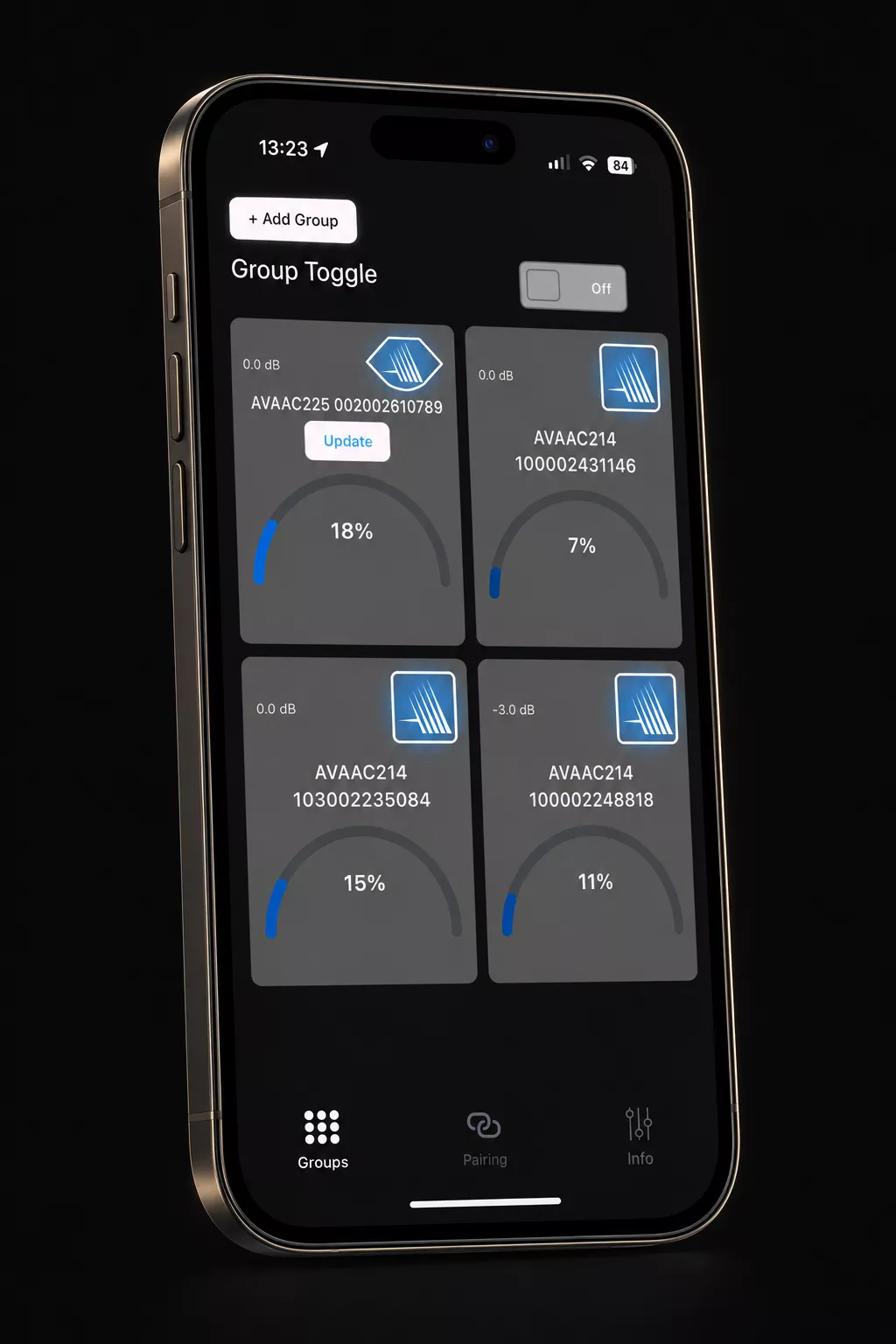
Access your AVAA controls through a dedicated app. Group units, control gain, switch on and off…
Find your settings
A clear home for available device settings.
Get help along the way
Pairing guidance, video tutorials and answers to your most common questions on this page. (COMING SOON)
AVAA C214
✓ AVAA Controller
AVAA C225
✓ AVAA Controller
APP UPDATES
THE LATEST.
AND WHAT CAME BEFORE.
Latest release
2026 – NOVEMBER – 9
What’s new
Version 1.7.1 · Firmware 3.1.4
New features
- Finer gain control — Set the gain of your AVAA in fine 0.375 dB steps from -12 to +6 dB, and see changes made on the device right away.Drag the gain slider on the device tile.Requires firmware 3.1.4 on your AVAA
Improvements
- Easier switching between groups — Your groups now sit in a scrolling bar that always starts with All devices, with a round + button to create a new group.Tap a group to show its devices, or All devices to see everything. Long-press a group to edit it.
- Simpler group editing — Add or remove devices from a group in one step, see which devices are reachable right now, and stay on the group after saving.Long-press a group, tick or untick devices, then tap Modify Group. A blue Wi-Fi icon means the device is online, a red crossed-out one that it is not reachable.
- Disabled devices stand out — A disabled AVAA now shows a red logo and a Disabled label on its tile, so you know at a glance how to turn it back on.Tap the red logo on the device tile to enable the device again.
- Back button returns to your devices — On Android, the back button now brings you back to All devices before it closes the app.
Fixes
- More reliable absorption meter — The absorption meter no longer shows rare false readings caused by a faulty internal measurement.Requires firmware 3.1.4 on your AVAA
Previous releases
Version 1.6.0
2026 – NOVEMBER – 9
FIRMWARE 3.1.3
New features
- See each AVAA's Wi-Fi network — Device settings now show which Wi-Fi network your AVAA is connected to, and the last one it used when it is offline.Tap a device tile to open its settings.Requires firmware 3.1.3 on your AVAA
- What's New page — See every new feature, and whether each of your AVAA devices supports it, in one place.Open Info, then What's New.
Improvements
- Absorption label on device tiles — The percentage on each device tile is now labelled Absorption, so you know what it measures.
Fixes
- Accurate online status — Your AVAA no longer shows as offline while it is working, and its tile comes back by itself after a restart.
- No more false 100% readings — The absorption meter no longer jumps to 100% because of a faulty reading.Requires firmware 3.1.1 on your AVAA
- Fixed crash on iOS 27 — The app no longer crashes when it starts on iOS 27.
Version 1.5.0
2026 – SEPTEMBER – 2
FIRMWARE 3.1.0
New features
- New device tile gestures — Tap a device tile to open its settings, tap its icon to mute or unmute, and long-press to rearrange your tiles.Long-press a tile, then drag it to its new place. The order is remembered.
Improvements
- Steadier connection on mesh Wi-Fi — Your AVAA stays connected on mesh Wi-Fi networks and reconnects by itself, without a power cycle.Requires firmware 3.1.0 on your AVAA
Fixes
- Device names are kept — The names you give your AVAA devices no longer go back to their default name.
- Smoother setup on Android — Setting up a new AVAA on Android no longer shows error messages while the setup is actually working.
Version 1.4.0
2026 – JULY – 22
FIRMWARE 3.0.0, 3.0.1
New features
- Support for AVAA C225 — Set up, control and update the AVAA C225 alongside your AVAA C214 devices.Requires firmware 3.0.0 on your AVAA
- Live absorption meter — Each device tile shows in real time how much your AVAA is absorbing.Requires firmware 3.0.0 on your AVAA
- Adjust the front LED — Set the brightness of your AVAA's front LED, or turn it off, from the app.Open the device settings and use the LED slider.Requires firmware 3.0.0 on your AVAA
- Name your devices — Give each AVAA a name of your choice, such as its place in the room.Open the device settings and edit its name.
Improvements
- Guided update for older firmware — Devices on older firmware are updated in two guided steps, with a countdown telling you when to continue.
- Reset the device list — If a device does not show up correctly, you can clear the app's saved device list and search again.Open Info, then Reset Cache.
- Refined interface — Better layout on iPad, haptic feedback on the controls, and support for iOS 26 and the latest Android versions.
Fixes
- No pop at startup — Your AVAA no longer makes a pop sound when it switches on.Requires firmware 3.0.0 on your AVAA
- Smoother device setup — The app asks you to turn on Wi-Fi when it is needed, and no longer crashes when opening the QR code scanner.
Version 1.0.1
2025 – FEBRUARY – 14
FIRMWARE 2.1.1
New features
- AVAA Controller is here — The new app for AVAA devices with firmware 2, replacing the PSI Audio app.
- Set up with a QR code — Scan the code on your AVAA and connect it to your Wi-Fi network in a few steps.
- Control each device — Adjust the gain of each AVAA and mute or unmute it from its tile.
- Groups — Group your devices by room or setup, and switch or mute a whole group at once.
- Firmware updates from the app — Update your AVAA's firmware over Wi-Fi, with a progress bar while it installs.Tap Update on a device tile when an update is available.
Improvements
- Help for older devices — Devices still on firmware 1 are recognised, and the app guides you to the PSI Audio app to update them first.Open Settings, then Redirect To Store.
PSI Audio 1.2
2023 – OCTOBER – 24
FIRMWARE 1.6, 1.6.1
New features
- The PSI Audio app — The first app for AVAA: set up your devices on Wi-Fi, control and group them, and update their firmware.
Fixes
- Reliable Wi-Fi reset — Resetting your AVAA's Wi-Fi settings now works every time.Requires firmware 1.6.1 on your AVAA
YOUR AVAA.
AT YOUR FINGERTIPS.
Get the app for your AVAA C214 or AVAA C225.